Read story

Why Every Diver Needs to Understand Their Most Important Safety Tool

scuba diver checking wrist-mounted dive computer - Dive computer explained

Dive computer explained in its simplest form: it's a wrist-worn or console-mounted device that continuously tracks your depth and time underwater. It then uses mathematical models to calculate how much longer you can safely stay at your current depth before risking decompression sickness.

This single device has revolutionized underwater safety by replacing the old method of using separate dive tables, depth gauges, and timers. It automatically performs several critical functions:

  • Monitors your depth and dive time in real-time
  • Calculates dissolved nitrogen levels in your body using a decompression algorithm
  • Displays your No Decompression Limit (NDL) — how much safe dive time remains
  • Warns you about unsafe ascent rates and required safety stops
  • Tracks previous dive information to account for residual nitrogen on repetitive dives

The computer continuously applies your depth and time data to a decompression model, tracking the theoretical nitrogen loading in your body. This means you get personalized dive limits based on your actual dive profile, not just generic table predictions. This allows divers to maximize bottom time while staying within safe limits.

Most scuba divers now consider a dive computer essential safety equipment. Whether you're a new diver or an experienced one, knowing how your dive computer works helps you make better, safer decisions underwater.
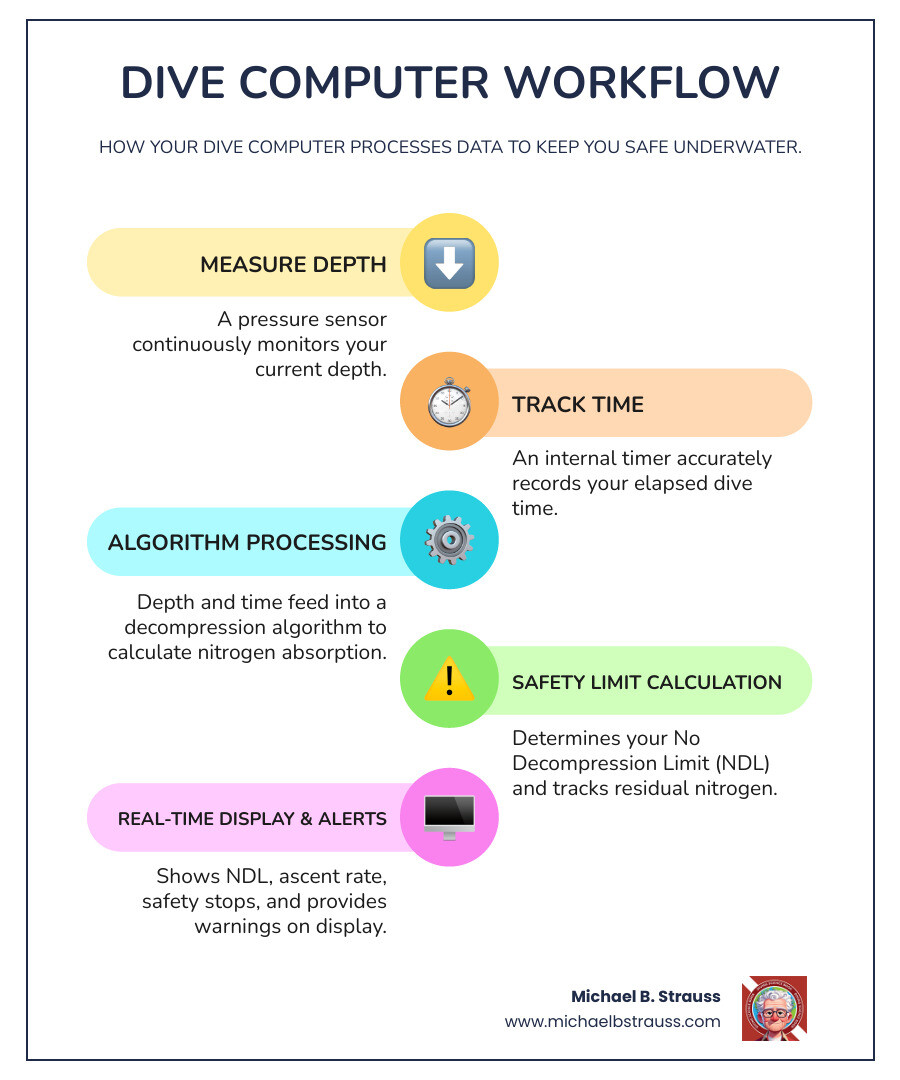
Infographic showing dive computer workflow: pressure sensor measures depth, timer tracks elapsed time, both feed into decompression algorithm in microprocessor, which outputs current NDL, required safety stops, ascent rate warnings, and nitrogen loading status on display - Dive computer explained infographic infographic-line-5-steps-colors

Dive computer explained word guide:

The Ultimate Dive Computer Explained: How It Keeps You Safe

A dive computer is one of the most important pieces of safety equipment for any scuba diver. Unlike traditional dive tables, which are static, a dive computer provides real-time, dynamic calculations customized to your specific dive profile, significantly reducing the chance of decompression sickness (DCS).

Reading the Screen: What Your Computer is Telling You

Modern dive computer displays provide a wealth of information at a glance to keep us safe and informed. Here's a breakdown of the key information typically displayed:

  • Current Depth: Your exact depth at any given moment.
  • Maximum Depth: The deepest point reached during the current dive.
  • Elapsed Dive Time: How long you've been underwater.
  • No Decompression Limit (NDL): A countdown of how much time you can safely remain at your current depth without needing mandatory decompression stops. This is the most critical piece of data for recreational divers.
  • Ascent Rate Monitor: A visual or auditory warning if you ascend too quickly (typically faster than 30 feet or 9 meters per minute).
  • Safety Stop Timer: Prompts you to perform a safety stop, usually for 3-5 minutes at 15-20 feet (5-6 meters), as an added safety buffer.
  • Water Temperature: Useful environmental data that can influence your body's nitrogen absorption.
  • Emergency Decompression: If you accidentally exceed no-decompression limits, the computer displays the required depth and duration of mandatory stops.
modern, color dive computer display with key information labeled - Dive computer explained

By continuously monitoring these data points, your dive computer allows you to make informed decisions and stay safe.

The Science of Safety: NDL, Algorithms, and Decompression

At the heart of every dive computer is a decompression algorithm. When we dive, the increased pressure causes nitrogen from our breathing air to dissolve into our body tissues. If we ascend too quickly, the pressure decreases rapidly, and the nitrogen can form bubbles, leading to decompression sickness.

Your dive computer uses its algorithm to continuously estimate the theoretical amount of nitrogen in your body. This allows it to display your No Decompression Limit (NDL). The NDL is not static; it changes with your depth and time. As you descend, your NDL decreases. As you ascend to shallower depths, your NDL may increase, allowing for longer multi-level dives. This is a key advantage over rigid dive tables.

Manufacturers use various algorithms, such as Bühlmann-based models or RGBM (Reduced Gradient Bubble Model). Many computers also allow you to adjust conservatism settings. A more conservative setting provides a larger safety margin by shortening your NDL, which is wise if you are cold, tired, or dehydrated.

For more in-depth understanding of the physiological processes, Dr. Michael B. Strauss's work on Decompression Science provides invaluable insights.

A Beginner's Dive Computer Explained: Core Safety Functions

For new divers, the computer simplifies managing decompression safety. Here are the core safety functions that make them indispensable:

  • Audible and Visual Alarms: Your computer will beep or flash warnings if you're ascending too fast, approaching your NDL, or need to perform a safety stop. These alerts provide immediate feedback to guide you.
  • Surface Interval Tracking: After a dive, the computer tracks your time on the surface. This is crucial for calculating residual nitrogen and adjusting the NDL for your next dive.
  • No-Fly Time: Nitrogen continues to off-gas after you surface. Your computer calculates a recommended "no-fly time" (typically 12-18 hours) to avoid DCS risk associated with cabin pressure changes during air travel.
  • Enriched Air (Nitrox) Compatibility: Many computers are compatible with enriched air nitrox. Since Nitrox has less nitrogen than air, it can extend your NDL. However, it's important to be trained in Nitrox diving to understand the associated risks, like oxygen toxicity, which the computer also helps monitor.

From Store to Sea: Choosing and Caring for Your Device

Choosing a dive computer can feel overwhelming, but considering your diving style and needs will help you find the perfect one. Once you have it, proper care ensures its longevity and reliability.

How to Choose the Right Dive Computer for You

Selecting the right dive computer comes down to your personal diving habits and budget. Here are key considerations:

  • Diving Style and Experience Level:

    • Beginners/Recreational Divers: Look for models with simplified interfaces, clear displays, and essential safety functions for air and nitrox diving.
    • Advanced and Technical Divers: If you plan to use multiple gas mixes (like trimix) or perform complex decompression dives, you'll need a computer with advanced features like multi-gas support and customizable algorithms.
  • Types of Dive Computers:

    • Wrist-Mount: Larger, dedicated computers worn on the wrist, often with large, easy-to-read displays.
    • Watch-Style: Compact computers that double as everyday watches, convenient for travel.
    • Console Computers: Integrated into your pressure gauge console for a consolidated information hub.
  • Display and Battery: Consider display readability (e.g., basic LCD vs. full-color) and battery type (user-changeable vs. rechargeable), as these affect convenience and usability.

To get personalized advice, we highly recommend visiting your local dive shop to see different models firsthand.

Beyond the Basics: Advanced Features and Gas Mixes

As your diving progresses, you may want a computer with more advanced functionalities.

  • Air Integration: A transmitter on your first stage regulator wirelessly sends tank pressure data to your computer. This allows the computer to calculate your Air Time Remaining (ATR) based on your breathing rate, providing a more complete picture of your dive limits.
  • Gas Switching: For technical divers using different gas mixtures on a single dive, this feature allows the computer to accurately calculate decompression based on the gas being breathed at each stage.
  • Nitrox, Trimix, and CCR Modes: Advanced computers support various gas mixes, including enriched air nitrox, trimix (for deep dives), and closed-circuit rebreathers (CCR), each with specific settings to manage oxygen exposure and decompression.
  • Digital Compass: An integrated, tilt-compensated digital compass provides underwater navigation, eliminating the need for a separate instrument.
  • Freediving Mode: Many computers include a dedicated mode for breath-hold diving that tracks depth, time, and surface intervals to improve safety for freedivers.
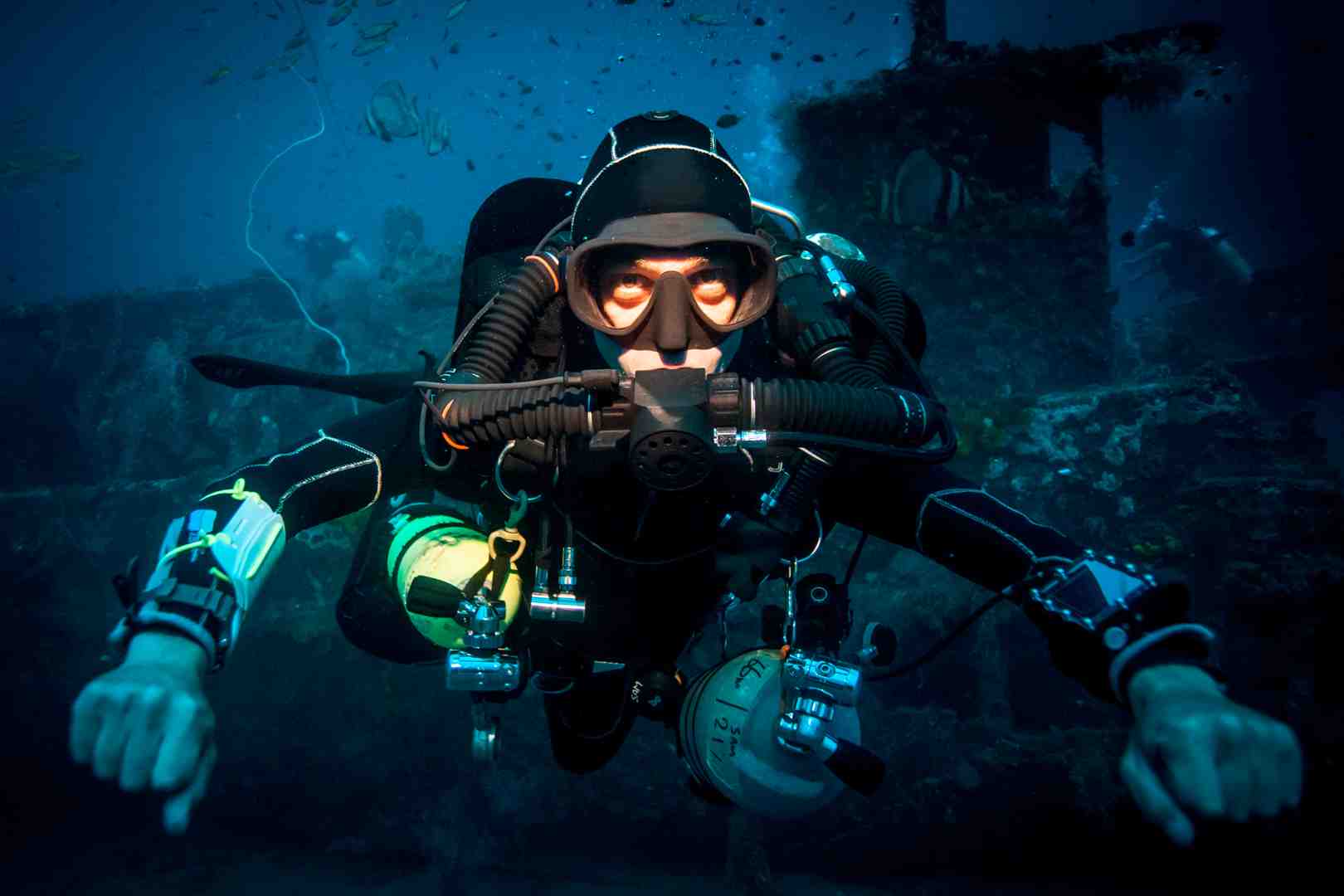
technical diver's setup showing an advanced dive computer - Dive computer explained

These advanced features cater to a wide range of diving activities, from recreational to complex technical expeditions.

Post-Dive Protocol: Maintenance and Logging

Your dive computer is a sophisticated electronic device that requires proper care to ensure its accuracy and reliability.

Essential Maintenance Steps:

  1. Rinse: Always rinse the computer thoroughly in fresh water after each use to remove salt and sand.
  2. Protection: Keep the computer out of direct sunlight and protect it from physical damage.
  3. Storage: Store it in a cool, dry place.
  4. Battery Care: Follow the manufacturer's instructions for battery maintenance and replacement.
  5. Service: Adhere to any recommended service intervals from the manufacturer.

Dive Logging and Analysis:

Modern dive computers record detailed dive profiles that can be downloaded to a laptop or smartphone. This digital dive log allows you to automatically transfer data like depth profiles, temperatures, and gas consumption (with air integration).

Reviewing your dive profiles helps you understand your diving habits, identify areas for improvement, and plan future dives more effectively. In the unfortunate event of a dive accident, this stored data can be crucial for understanding what happened. This information can be vital for experts to analyze incidents and promote Diving Science.

Regularly reviewing your dive data is an excellent way to continue learning and improving as a diver. For more comprehensive insights into dive safety and advanced techniques, get your copy of "Diving Science Revisited" here: https://www.bestpub.com/view-all-products/product/diving-science-revisited/category_pathway-48.html

DISCLAIMER: Articles are for "EDUCATIONAL PURPOSES ONLY", not to be considered advice or recommendations.

Download Full PDF
Tags:

Why Every Diver Needs to Understand Their Most Important Safety Tool

scuba diver checking wrist-mounted dive computer - Dive computer explained

Dive computer explained in its simplest form: it's a wrist-worn or console-mounted device that continuously tracks your depth and time underwater. It then uses mathematical models to calculate how much longer you can safely stay at your current depth before risking decompression sickness.

This single device has revolutionized underwater safety by replacing the old method of using separate dive tables, depth gauges, and timers. It automatically performs several critical functions:

  • Monitors your depth and dive time in real-time
  • Calculates dissolved nitrogen levels in your body using a decompression algorithm
  • Displays your No Decompression Limit (NDL) — how much safe dive time remains
  • Warns you about unsafe ascent rates and required safety stops
  • Tracks previous dive information to account for residual nitrogen on repetitive dives

The computer continuously applies your depth and time data to a decompression model, tracking the theoretical nitrogen loading in your body. This means you get personalized dive limits based on your actual dive profile, not just generic table predictions. This allows divers to maximize bottom time while staying within safe limits.

Most scuba divers now consider a dive computer essential safety equipment. Whether you're a new diver or an experienced one, knowing how your dive computer works helps you make better, safer decisions underwater.

Infographic showing dive computer workflow: pressure sensor measures depth, timer tracks elapsed time, both feed into decompression algorithm in microprocessor, which outputs current NDL, required safety stops, ascent rate warnings, and nitrogen loading status on display - Dive computer explained infographic infographic-line-5-steps-colors

Dive computer explained word guide:

The Ultimate Dive Computer Explained: How It Keeps You Safe

A dive computer is one of the most important pieces of safety equipment for any scuba diver. Unlike traditional dive tables, which are static, a dive computer provides real-time, dynamic calculations customized to your specific dive profile, significantly reducing the chance of decompression sickness (DCS).

Reading the Screen: What Your Computer is Telling You

Modern dive computer displays provide a wealth of information at a glance to keep us safe and informed. Here's a breakdown of the key information typically displayed:

  • Current Depth: Your exact depth at any given moment.
  • Maximum Depth: The deepest point reached during the current dive.
  • Elapsed Dive Time: How long you've been underwater.
  • No Decompression Limit (NDL): A countdown of how much time you can safely remain at your current depth without needing mandatory decompression stops. This is the most critical piece of data for recreational divers.
  • Ascent Rate Monitor: A visual or auditory warning if you ascend too quickly (typically faster than 30 feet or 9 meters per minute).
  • Safety Stop Timer: Prompts you to perform a safety stop, usually for 3-5 minutes at 15-20 feet (5-6 meters), as an added safety buffer.
  • Water Temperature: Useful environmental data that can influence your body's nitrogen absorption.
  • Emergency Decompression: If you accidentally exceed no-decompression limits, the computer displays the required depth and duration of mandatory stops.

modern, color dive computer display with key information labeled - Dive computer explained

By continuously monitoring these data points, your dive computer allows you to make informed decisions and stay safe.

The Science of Safety: NDL, Algorithms, and Decompression

At the heart of every dive computer is a decompression algorithm. When we dive, the increased pressure causes nitrogen from our breathing air to dissolve into our body tissues. If we ascend too quickly, the pressure decreases rapidly, and the nitrogen can form bubbles, leading to decompression sickness.

Your dive computer uses its algorithm to continuously estimate the theoretical amount of nitrogen in your body. This allows it to display your No Decompression Limit (NDL). The NDL is not static; it changes with your depth and time. As you descend, your NDL decreases. As you ascend to shallower depths, your NDL may increase, allowing for longer multi-level dives. This is a key advantage over rigid dive tables.

Manufacturers use various algorithms, such as Bühlmann-based models or RGBM (Reduced Gradient Bubble Model). Many computers also allow you to adjust conservatism settings. A more conservative setting provides a larger safety margin by shortening your NDL, which is wise if you are cold, tired, or dehydrated.

For more in-depth understanding of the physiological processes, Dr. Michael B. Strauss's work on Decompression Science provides invaluable insights.

A Beginner's Dive Computer Explained: Core Safety Functions

For new divers, the computer simplifies managing decompression safety. Here are the core safety functions that make them indispensable:

  • Audible and Visual Alarms: Your computer will beep or flash warnings if you're ascending too fast, approaching your NDL, or need to perform a safety stop. These alerts provide immediate feedback to guide you.
  • Surface Interval Tracking: After a dive, the computer tracks your time on the surface. This is crucial for calculating residual nitrogen and adjusting the NDL for your next dive.
  • No-Fly Time: Nitrogen continues to off-gas after you surface. Your computer calculates a recommended "no-fly time" (typically 12-18 hours) to avoid DCS risk associated with cabin pressure changes during air travel.
  • Enriched Air (Nitrox) Compatibility: Many computers are compatible with enriched air nitrox. Since Nitrox has less nitrogen than air, it can extend your NDL. However, it's important to be trained in Nitrox diving to understand the associated risks, like oxygen toxicity, which the computer also helps monitor.

From Store to Sea: Choosing and Caring for Your Device

Choosing a dive computer can feel overwhelming, but considering your diving style and needs will help you find the perfect one. Once you have it, proper care ensures its longevity and reliability.

How to Choose the Right Dive Computer for You

Selecting the right dive computer comes down to your personal diving habits and budget. Here are key considerations:

  • Diving Style and Experience Level:

    • Beginners/Recreational Divers: Look for models with simplified interfaces, clear displays, and essential safety functions for air and nitrox diving.
    • Advanced and Technical Divers: If you plan to use multiple gas mixes (like trimix) or perform complex decompression dives, you'll need a computer with advanced features like multi-gas support and customizable algorithms.
  • Types of Dive Computers:

    • Wrist-Mount: Larger, dedicated computers worn on the wrist, often with large, easy-to-read displays.
    • Watch-Style: Compact computers that double as everyday watches, convenient for travel.
    • Console Computers: Integrated into your pressure gauge console for a consolidated information hub.
  • Display and Battery: Consider display readability (e.g., basic LCD vs. full-color) and battery type (user-changeable vs. rechargeable), as these affect convenience and usability.

To get personalized advice, we highly recommend visiting your local dive shop to see different models firsthand.

Beyond the Basics: Advanced Features and Gas Mixes

As your diving progresses, you may want a computer with more advanced functionalities.

  • Air Integration: A transmitter on your first stage regulator wirelessly sends tank pressure data to your computer. This allows the computer to calculate your Air Time Remaining (ATR) based on your breathing rate, providing a more complete picture of your dive limits.
  • Gas Switching: For technical divers using different gas mixtures on a single dive, this feature allows the computer to accurately calculate decompression based on the gas being breathed at each stage.
  • Nitrox, Trimix, and CCR Modes: Advanced computers support various gas mixes, including enriched air nitrox, trimix (for deep dives), and closed-circuit rebreathers (CCR), each with specific settings to manage oxygen exposure and decompression.
  • Digital Compass: An integrated, tilt-compensated digital compass provides underwater navigation, eliminating the need for a separate instrument.
  • Freediving Mode: Many computers include a dedicated mode for breath-hold diving that tracks depth, time, and surface intervals to improve safety for freedivers.

technical diver's setup showing an advanced dive computer - Dive computer explained

These advanced features cater to a wide range of diving activities, from recreational to complex technical expeditions.

Post-Dive Protocol: Maintenance and Logging

Your dive computer is a sophisticated electronic device that requires proper care to ensure its accuracy and reliability.

Essential Maintenance Steps:

  1. Rinse: Always rinse the computer thoroughly in fresh water after each use to remove salt and sand.
  2. Protection: Keep the computer out of direct sunlight and protect it from physical damage.
  3. Storage: Store it in a cool, dry place.
  4. Battery Care: Follow the manufacturer's instructions for battery maintenance and replacement.
  5. Service: Adhere to any recommended service intervals from the manufacturer.

Dive Logging and Analysis:

Modern dive computers record detailed dive profiles that can be downloaded to a laptop or smartphone. This digital dive log allows you to automatically transfer data like depth profiles, temperatures, and gas consumption (with air integration).

Reviewing your dive profiles helps you understand your diving habits, identify areas for improvement, and plan future dives more effectively. In the unfortunate event of a dive accident, this stored data can be crucial for understanding what happened. This information can be vital for experts to analyze incidents and promote Diving Science.

Regularly reviewing your dive data is an excellent way to continue learning and improving as a diver. For more comprehensive insights into dive safety and advanced techniques, get your copy of "Diving Science Revisited" here: https://www.bestpub.com/view-all-products/product/diving-science-revisited/category_pathway-48.html

DISCLAIMER: Articles are for "EDUCATIONAL PURPOSES ONLY", not to be considered advice or recommendations.